"Time blindness" is the term many people with ADHD use for losing track of time: five minutes that turn into an hour, being sure there is plenty of time until suddenly there is none, or not starting because the task feels endlessly far away. Willpower does not fix it. Making time visible does. Here are practical tools that help, and why they work.
This post is about everyday tools, not medical advice. If time management is seriously affecting your life, talking to a doctor or ADHD specialist is worth it.
Why "just use a calendar" often fails
Calendars and to-do lists store time as text: "Dentist, 11:00". Reading that does not create any feeling of how far away 11:00 is, or how long the trip takes. For many ADHD brains, time only feels real when you can see it moving. The tools below all turn time into something you can see or hear.
1. Visual timers
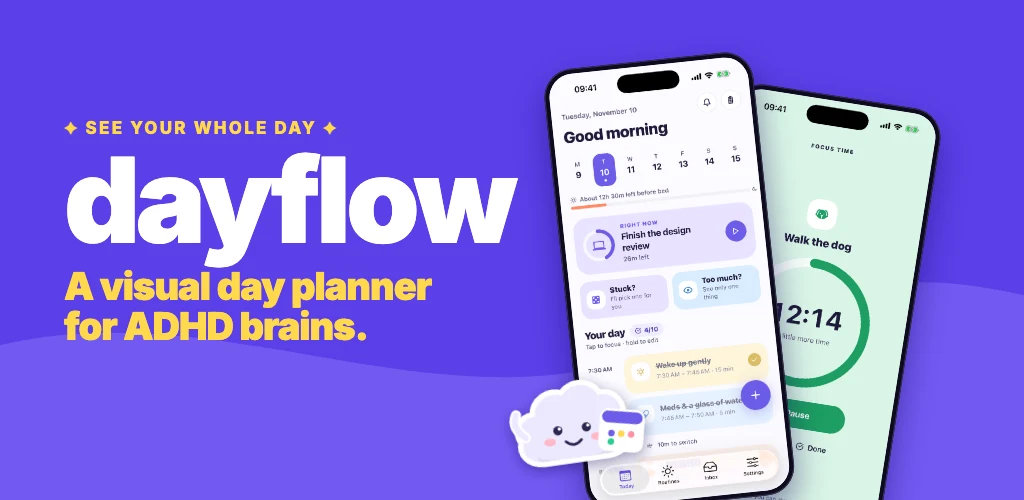
A visual timer shows the remaining time as a shrinking colored area instead of digits. You can tell at a glance whether you have "a lot" or "a little" left, without doing any maths. They work well for getting started, for staying on one task, and for transitions like "ten minutes until we leave".
2. A timeline of the whole day
A list hides how long things take. A timeline, where each task is a block sized by its duration, shows immediately whether the day actually fits. Seeing "about 12 hours left before bed" next to the plan is often enough to cut it down to something realistic.
3. Leave-by reminders, not start-time reminders
A reminder at 11:00 for an 11:00 appointment is useless if the trip takes 20 minutes. Better reminders count backwards: when to get ready, when to leave, and what to take ("Leave at 10:50. Shoes, keys, phone").
4. Buffers between tasks
Switching tasks takes time, especially with ADHD. Planning a few minutes of transition between blocks keeps one overrun from pushing the whole day late.
5. A two-minute start
The hardest part of a task is often starting it. Committing to just two minutes lowers the barrier enough to begin, and once you have started, continuing is much easier.
6. Check in on energy
Some days the full plan is not possible. Choosing between a lighter plan and a full plan based on how you feel in the morning is more sustainable than failing at the same plan every low-energy day.
7. Look back without scores
Streaks and scores can turn one missed day into a reason to quit. A gentle weekly look back at what you did get done builds momentum instead of guilt.
Putting it together
We built Dayflow around these ideas: a visual day timeline, focus timers that show time passing, step-by-step routines, leave-by nudges, a two-minute start button, a morning energy check-in and a weekly look back with no streaks. You do not need an app to use any of these techniques, but having them in one place means less to remember, which is the whole point.